Newsletter | May 2026
From Caversham House this month: 3 strategic insights on the trends reshaping how organisations think about AI, 3 tools we've been testing at the frontline and 3 training courses to help your teams build real capability and move from curiosity to confident action.
1. The Month in View: 3 Strategic Trends
Curated insights to help you read the room and lead the shift.
Trend 1: It's Different Jobs, Not Fewer Jobs
AI is reshaping the structure of work rather than driving wholesale replacement. The risk for most organisations isn't mass redundancy but mass mismatch: people stuck in the old shape of their roles while the work itself has moved on, like an admin team still measured on volume of documents drafted, or a manager whose value sat in coordination that AI now handles.
- A million London jobs are highly or significantly exposed to AI, but exposure isn't elimination: administrative and analytical work is most likely to be augmented, not removed.
- Only 18% of US jobs face higher short-term automation risk; another 24% will see tasks shift with people still firmly in the loop and 12% may actually grow.
- The emerging career divide isn't between humans and AI, but between people who use AI to redesign their work and those who use it only for small efficiency gains.
Call to action: Those who learn to direct AI and reshape their roles around it will pull ahead of those still waiting to see what gets automated.
- Map tasks, not job titles
- Train for orchestration, not just prompts
- Reward redesign, not just adoption
Relevant courses:
Redesigning How Work Gets Done with AI (C-Suite) | Human Skills in an AI-Enabled Workplace (All Staff)
Read more:
AI puts one fifth of London jobs at risk | The AI jobs transition framework | A Yale economist says AI won't automate most jobs | Will AI replace my job in the next 12 months? | The new AI career divide is already starting to show
Trend 2: Redesign, Don't Retrofit
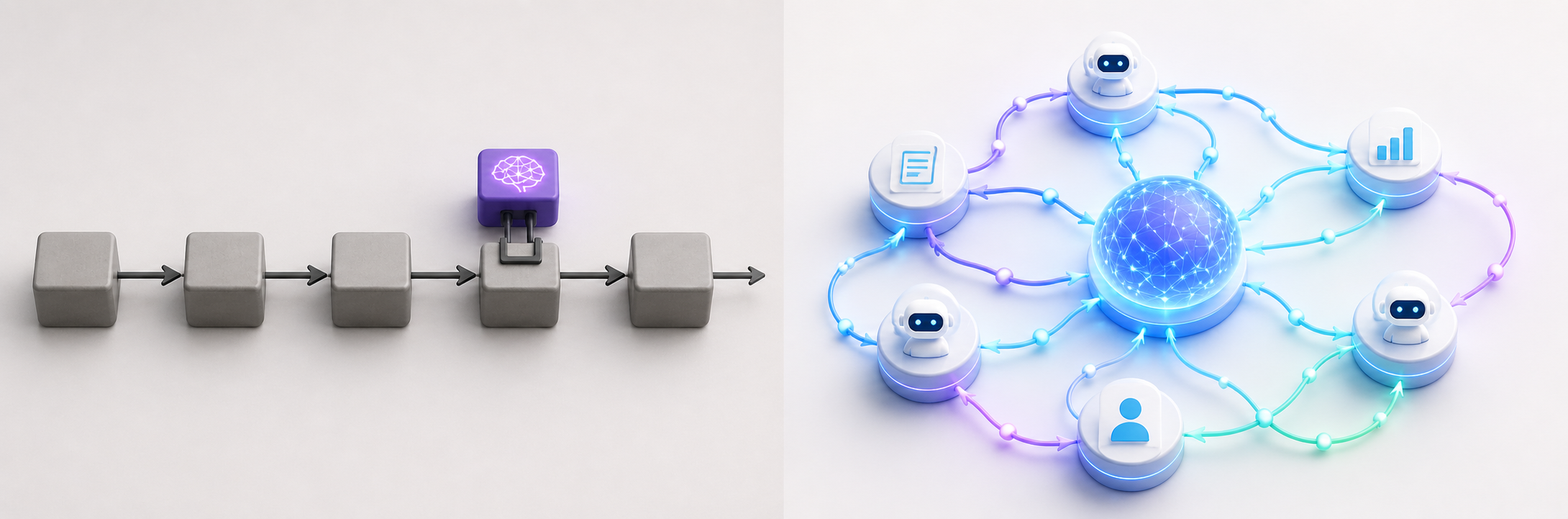
The biggest gains from AI aren't coming from layering it onto how work already gets done but rather they're coming from rebuilding the work itself. Companies bolting AI onto legacy processes see incremental returns at best, while those rewiring operating models around agents and AI-native workflows pull meaningfully ahead.
- Most companies are still adding AI to legacy workflows and capturing only incremental benefits, while AI-first redesign is where outsized value sits.
- The harder task is redesigning what work exists, who does it and how decisions get made.
- AI-ready teams are defined by their operating design, such as shared workflows, explicit decision rights, credible data and clear accountability, not by the tools they use.
Call to action: Treating AI as a redesign challenge rather than a deployment exercise is what separates organisations seeing real returns from those still running pilots that don't scale.
- Redesign end-to-end journeys, not individual tasks
- Make CEO sponsorship visible
- Build governance and decision rights into the workflow
Relevant courses:
Designing AI-Enabled Operating Models (C-Suite) | Leading Teams Through New AI Workflows (Team Leaders)
Read more:
Design your company for AI, not AI for your company | AI has made work reinvention a CEO mandate | Building AI-Ready Teams: Skills, Mindset and Structures
Trend 3: Hallucinations: When AI Confidently Makes Things Up
AI hallucinations are no longer a curious quirk of early chatbots because now they're showing up in court filings, government policy and senior professional work, with real consequences. The failures aren't happening because organisations lack AI policies, but because verification steps are skipped, secondary reviews fail and confident-sounding outputs slip through unchecked.
- A major Wall Street law firm apologised to a US federal judge after its court filing contained AI-generated errors, which included inaccurate case citations, despite the firm having both AI policies and training in place.
- South Africa withdrew its Draft National AI Policy after journalists discovered at least 6 of its 67 academic citations were fabricated by AI, with the minister calling it a failure of oversight rather than a technical glitch.
Call to action: Hallucinations are a known limitation, not a surprise. The organisations that stay out of the headlines will be the ones who treat verification as a non-negotiable step in every AI workflow, not a discretionary one.
- Make source verification mandatory, not optional
- Audit compliance with AI policies, not just intent
- Train people to spot confident-sounding fabrication
Relevant courses:
AI Bias and Fairness: What Every Employee Should Know (All Staff) | Helping Your Team Use AI Responsibly and Consistently (Team Leaders)
Read more:
AI hallucinations found in Wall Street law firm filing | South Africa withdraws AI policy due to fake AI-generated sources
2. The Toolbelt: 3 Updates from the Frontline
What we've been trying out at Caversham House and why it matters for your stack.
Microsoft 365 Copilot's meeting time analytics
Available on: Microsoft 365 Copilot plans
What it is: Copilot's meeting time analytics lets you query your Outlook calendar in plain language, returning visualised breakdowns by category and month-over-month comparisons.
Why we love it: No spreadsheets, no exports, you just ask. Our Learning Director Philippa Cameron prompted Copilot to "show me my meeting time split between internal team meetings and client-facing work for April", then repeated it for March. She spotted internal meeting time had risen noticeably, and realised several meetings overlapped enough to consolidate, freeing up real time for focused work.
Limitations: It missed one meeting in the breakdown, but that was because that time had been blocked out manually without flagging it as a meeting. A useful reminder that the analytics are only as good as the data underneath.
Value: A 30-second conversation can free up time in your week.
OpenAI's ChatGPT Images 2.0
Launched late April 2026
What it is: ChatGPT Images now brings near-perfect text rendering inside images and a reasoning layer that plans the layout before drawing.
Why we love it: Text has been the long-standing weak spot of AI image generation. We tested it on a client infographic mapping out our client journey, with quite a bit of layered text and complex ideas. The text came out almost perfectly first time, and it captured the nuance rather than reducing it to vague labels.
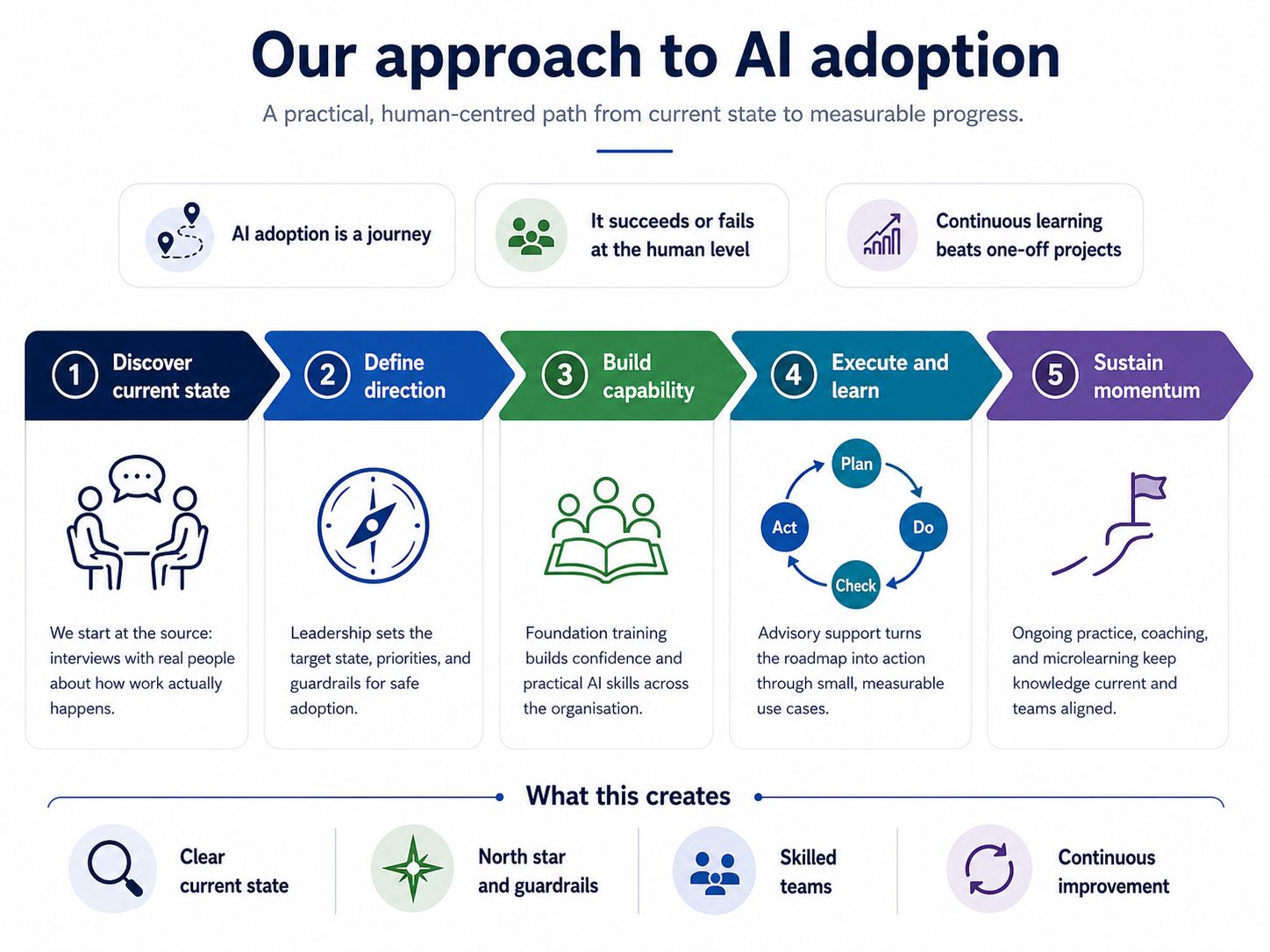
Limitations: Still needs a human eye for production work. Faces, technical diagrams and unusual brand names often need explicit prompting.
Value: Production-ready images in minutes.
Tool 3: OpenAI Codex (From Coding Agent to Desktop Agent)
Feature launched: May 2025 (cloud agent); major expansion April 2026
What it is: OpenAI's agentic platform, originally built for software engineering tasks, now repositioned as a broader AI workspace with connectors, automations and desktop control.
Why we looked at it: We tested it directly against Claude CoWork on macOS. The April 2026 update is genuinely ambitious: Codex now has a Skills section covering tools like Notion, Figma and Linear, plus scheduled automations and an in-app browser.
Limitations: The gap between the marketing and the experience is real, at least for now. Connecting a tool like Linear requires editing config files, running CLI commands and manually triggering an OAuth flow. In CoWork, you click, authenticate and work. That difference isn't cosmetic: it determines whether a non-technical team member can self-serve or needs someone like us to set it up for them. Automations exist but skew heavily toward developer tasks such as checking pull requests and monitoring builds. UK users also get a reduced feature set at launch: computer use and memory are geo-restricted with no confirmed rollout date.
Value: Codex is moving in the right direction and the direction is clearly toward knowledge work, not just code. But it is making that journey from the engineering end of the spectrum, and the friction shows. The right question for any team evaluating AI tools in 2026 is not just what a tool can do, but who in your organisation can actually make it do it.
3. Training Update: Learning Spotlight
Highlighting our newest course builds and strategy-focused updates designed to help your organisation lead the transition.
Hiring an AI-First CTO
Duration: 30–45 minutes
Who it's for: CEOs, boards and senior leaders
Equip leaders with a structured approach to hiring an AI-first CTO.
Takeaway: A job description for an AI-first CTO that leaders can use to shape recruiting, assessment and onboarding.
Key learnings:
- Why AI-first CTO leadership matters
- What distinguishes an AI-first CTO from a traditional one
- Core competencies to assess
- A structured selection and onboarding plan
How to Be an AI-First CTO
Duration: 30–45 minutes
Who it's for: Current and aspiring CTOs
Equip yourself to be an AI-first CTO.
Takeaway: A personal development plan to shape your growth, priorities and onboarding into the role.
Key learnings:
- Why AI-first CTO leadership matters
- What distinguishes an AI-first CTO from a traditional one
- Core competencies to develop
- A structured personal action plan
Pop-up Module: AI Memory
AI Memory: What Your Tools Now Remember About You
Duration: 15 minutes
Who it's for: All staff
AI tools have recently gained the ability to remember information across conversations. This module explains what that means in practice, why it matters for data decisions and how to manage it.
Ready to take the next step?
- Already a subscriber? These modules are live in your training portal now.
- Thinking about subscribing? Take a look at our 2026 Training Subscriptions to see what's included and how it works for your team.
- Want to talk strategy? Book a briefing or contact us and we can work through your 2026 AI priorities together.